Affordable Scrapbooking Kits on Etsy – Safe & Instant Download


Resolution and size for a scrapbooking collection or paper

What resolution should digital scrapbook paper be?
Use 300 DPI for print-quality digital scrapbook paper. A 12 × 12-inch page should be 3600 × 3600 pixels. US Letter should be 2550 × 3300 pixels, and A4 should be approximately 2480 × 3508 pixels.
DPI alone does not create detail: the file must contain enough pixels for the chosen print size. Use the 300 DPI calculator to check another size.
You are starting in scrapbooking and you are creating a collection to share, you would like to sell and you don’t know what size is recommended? Here is a little guide.
What is the resolution that a scrapbook collection should have?
This is really something that everyone has to evaluate, but what I can help you with is the standard sizes that we should give to our documents.
| SIZE | PIXEL 300PPP | REAL SIZE MM | REAL SIZE IN |
|---|---|---|---|
| A0 | 14043 x 9933 | 1189 x 841 mm | 33,1 x 46,2 |
| A1 | 9933 x 7016 | 841 x 594 mm | 23,4 x 33,1 |
| A2 | 7016 x 4961 | 594 x 420 mm | 16,5 x 23,4 |
| A3 | 4961 x 3508 | 420 x 297 mm | 11,7 x 16,5 |
| A4 | 3508 x 2480 | 297 x 210 mm | 8,3 x 11,7 |
| A5 | 2480 x 1748 | 210 x 148 mm | 5,8 x 8,3 |
| A6 | 1748 x 1240 | 148 x 105 mm | 4,1 x 5,8 |
Recommended sizes for scrapbook collection?
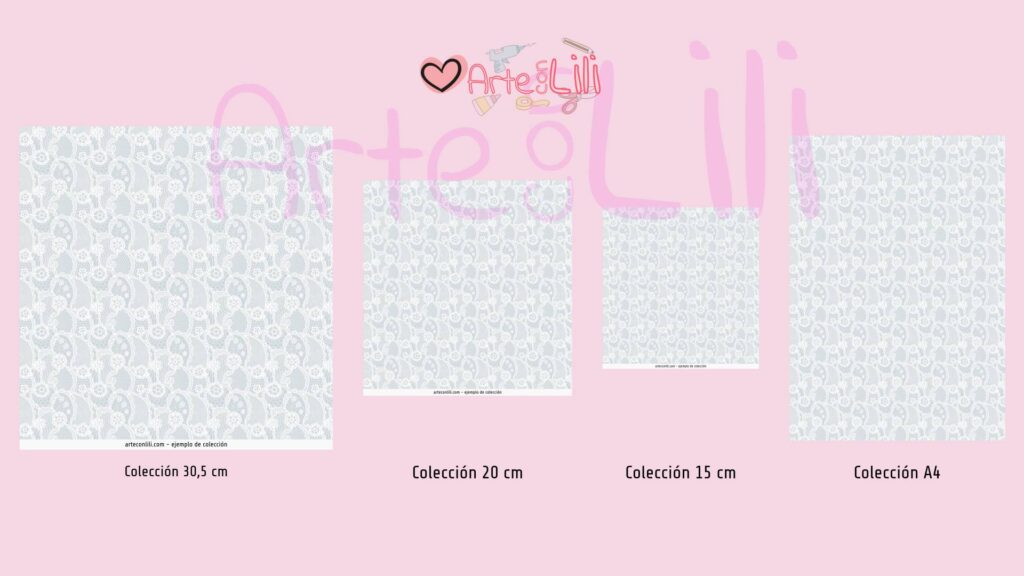
Normally a scrapbook collection works with 4 types of sizes:
- Printed: The print collections usually have a size of 305 x 315mm or 12′ x12′ in which one of the larger centimeters it contains is to place the information of the collection as the example above that will be with one of the next collections I make.
- The printing collections also usually have smaller sizes but less usual these sizes are:
- 20cm or 8 inches, these are less usual and you can find them in many of the stores.
- 15cm or 6 inches, like the previous ones are less common.
- The printing collections also usually have smaller sizes but less usual these sizes are:
- In PDF (A4): Many of the scrapbookers who do not have the possibility to sell their collections in physical format, usually create these collections that come in A4 paper format.
- The recommended resolutions for A4 are: 3508 x 2480.
- If you have a printer that has the possibility to print in A3 format, you have to verify that the collection is prepared for these formats.
- The recommended resolution for A3 paper is 4961 x 3508.
Is there any possibility to improve the size of the A4 collection for A3 printing?
On the internet you can find some websites that increase the size of JPG images.
If you have bought a collection that is not in A3 format and you want to improve the size you can use one of the image resizing tools. These online tools usually improve the image size without losing much quality.
And then you can have your collection in A3 format.
This entry was posted in freescrapbooking.art by Liliana CSC. You can also see more information at arteconlili.com.